Design & Workflow
Workspace & Setup
Layers & Masks
Tools & Editing
Files & Export
100
What document should you review to understand a client's goals, audience, and project requirements?
A project brief.
100
Which Photoshop panel organizes the individual elements of a document?
The Layers panel.
100
What does the eye icon next to a layer do?
It toggles the layer's visibility.
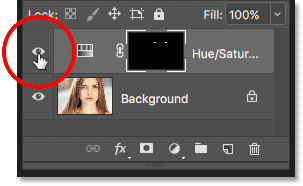
100
Which tool selects a rectangular or elliptical area of an image?
The Marquee tools.
100
Which file format preserves Photoshop layers for continued editing?
PSD
200
What does copyright protect when using photographs, graphics, and other creative assets?
The creator's original work. You should obtain permission or use assets with an appropriate license when required.
200
What does the Options bar display?
Settings and controls for the currently selected tool.
200
What does a layer mask allow you to do?
Hide or reveal parts of a layer without permanently deleting its pixels.
200
Name a Photoshop tool or command that can help select a person from a background.
Select Subject or the Object Selection tool.
200
Which format commonly supports transparency for web graphics: JPEG or PNG?
PNG
300
A client requests several changes that were not part of the original agreement. What project management term describes this?
Scope creep.
300
Which color mode is generally appropriate for graphics designed for screens: RGB or CMYK?
RGB.
300
On a standard layer mask, what do black, white, and gray represent?
Black conceals, white reveals, and gray partially conceals.
300
You selected the background but need to select the person instead. What command reverses the selection?
Select > Inverse. Shortcut: Shift+Command+I on Mac.
Or Command Z to undo
300
What is the difference between saving a Photoshop document and exporting an image?
Saving preserves the working document and its editable structure; exporting creates a file for a particular delivery or use.
400
Name two things to consider before choosing a layout and typography for a school flyer.
Audience, purpose, readability, accessibility, required information, or where it will be displayed.
400
What resolution is commonly used as a starting point for high-quality printing?
300 pixels per inch (PPI), while confirming the printer's requirements and the image's actual pixel dimensions.
400
How can you adjust a photograph's brightness without permanently changing its original pixels?
Use a Brightness/Contrast adjustment layer or another appropriate adjustment layer.
400
What is the difference between the Spot Healing Brush and Clone Stamp?
Spot Healing blends image information to repair an area; Clone Stamp copies pixels from a sampled source.
400
Why might you deliver a JPEG photograph instead of a layered PSD for a website?
JPEG is widely compatible and compressed, making it useful for photographic web content, but it does not preserve layers or transparency.
500
A client needs a logo for social media and a large printed banner. What should you consider when preparing the artwork?
Use scalable vector artwork when appropriate, and confirm file format, resolution, color mode, and output requirements.
500
Your Photoshop panels have disappeared. How can you restore your workspace?
Go to Window > Workspace and select or reset a workspace.
500
What should you do before repeatedly transforming a photograph to help preserve its original image data?
Convert the layer to a Smart Object.
500
Which workspace can help refine a selection around curly hair and other fine edges?
Select and Mask, including the Refine Edge Brush when appropriate.
500
A client needs an editable Photoshop file and a transparent logo for a website. Which two file formats should you deliver?
A layered PSD and a transparent PNG. Check that the PSD remains editable and the PNG has the correct dimensions and transparency.