Components & Peripherals I
Components & Peripherals & OS
Network Issues
Network Issues & Security
Terms and Concepts
100
What causes a printer to print unknown characters?
If unrecognized characters are printed, a likely cause is that an incorrect printer driver is installed or a loose USB cable.
100
If a computer is displaying slow performance when a specific application is being used what do you need to do to solve this issue?
If a computer is displaying slow performance when a specific application is being used, more RAM may need to be installed.
100
What are the trouble shooting steps for a PC that is connected to a wired network and not getting an valid IP?
Check to make sure your IP setting are correct. (Static IP or DHCP).
Pinging the loopback address. The network card is working if the loopback address can be pinged.
Check the LED on the NIC. If the LED on the network card is off that points towards a faulty cable or a bad connection.
100
You get a IP address conflict message...
What do you do?
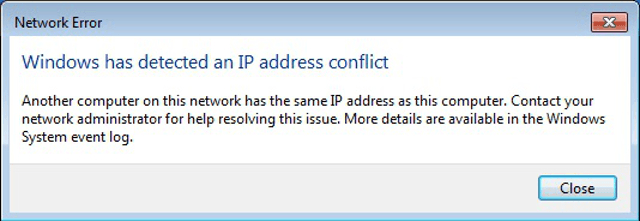
If an IP address conflict message is displayed, then a single IP address is being used more than once on the same network. To solve this issue, the administrator needs to give a different static IP address to that device on the network.
The other possible issue is that the IP was not reserved on the DHCP server/router. Make sure it is reserved for that specific device so another device doesn't request it.
100
Problem: Slow computer hardware performance
Possible solutions?
1. Add RAM.
2. Clean or install additional fans to prevent overheating.
200
Why would only 1 CPU of a multi-core CPU be listed in windows Task Manager?
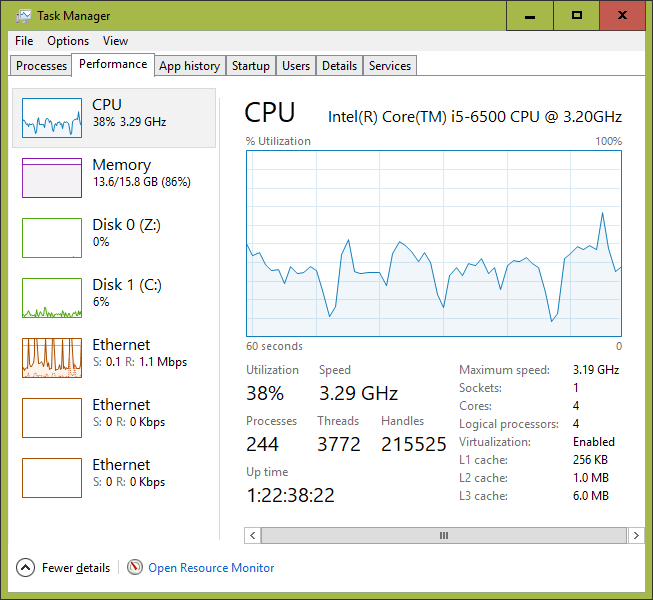
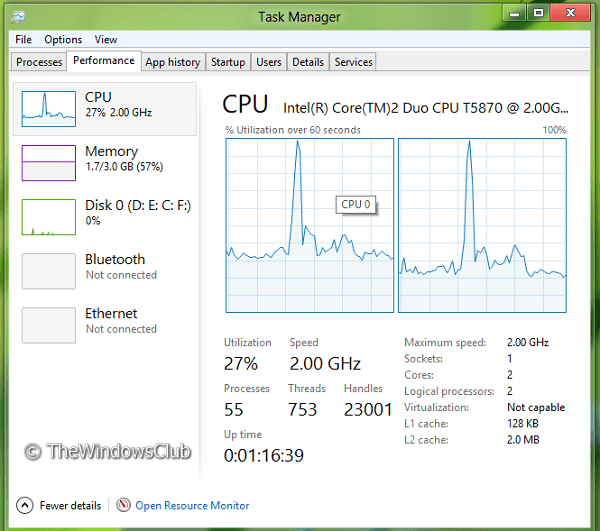
The fact that there is only one CPU graph available indicates that the technician needs to upgrade the BIOS firmware to support a dual core CPU.
200
Your 3rd cousin Billy updated the BIOS firmware on his computer and now it wont boot.
What needs to be done to fix the issue.
After the CMOS/BIOS on a computer is updated and the computer fail to boot, it is likely that the CMOS/BIOS firmware was installed incorrectly. The original firmware should be restored or a new CMOS/BIOS must be obtained from the motherboard manufacturer.
200
What would cause a WiFi connection to be slow and or have intermittent connection issues?
Normally, the closer a wireless NIC is to an access point, the faster the connectivity.
The combination of the low bandwidth and the intermittent connectivity is pointing towards a weak signal or interference from outside sources.
200
Why would you schedule your antivirus to scan your computer during off work hours.
Antivirus software that is scheduled to run during working hours may cause computer performance issues.
200
Problem: "Invalid Boot Disk" error after POST
Possible solutions?
1. Change boot order in BIOS
2. Reconnect drive cables
3. Use bootrec/fixmbr
300
What would cause RAID to stop working?
If the external RAID controller loses power or the RAID controller fails, RAID will stop working. Hard drive cables connected incorrectly would have prevented RAID from starting.
300
What is a BSOD and what causes it?
A Blue Screen of Death (BSOD) is usually caused by device driver compatibility errors or hardware failure.
300
Aunt Sally has called you 3 times about an email she keeps sending you but you aren't get it. In fact you aren't getting any email right now but you can send email. What might be the problem?
A user who can send email but is unable to receive email may have incorrect email settings configured on his or her workstation. Email is received using POP3 or IMAP.
300
What will a boot sector virus do?
A boot sector virus will alter the MBR and cause Windows to not start displaying the "MBR has been changed or modified".
300
Problem: Laser printer prints vertical streaks on every page.
Possible solutions?
1. Replace the drum or the laser cartridge.
2. Remove and shake the toner cartridge.
400
Your Printer is having issues.
The toner is wiping off pages after you print them.
What is the causing the problem?
This lack of fusion can mean that the fuser component of the printer could be defective and requires replacement.
400
What would cause a computer to lock up without any error messages?
If a computer locks without an error message, hardware or software could be the issue. Problems could include the following:
- The CPU or FSB are set incorrectly on the motherboard or in the BIOS.
- The computer is overheating.
- An update has corrupted the operating system.
- The RAM is failing or a RAM module is failing.
- The hard drive is failing.
- The power supply is failing.
- The computer has a virus.
400
Your little brother or sister decided it was finally time to try that Fort something game. They boot up your gaming rig but can't get on the internet. They think they are a smart cookie and remember you telling them some trouble shooting stuff and type in ipconfig into the command prompt. IT shows they have an IP address. It's 169.254.10.158. Confused they give up and call you. What is the problem?
If the PC's IP address is within the range 169.254.0.0 - 169.254.255.255 then PC is not able to connect to a DHCP from your router or DHCP server (if at work) to get a valid IP. Re-start the DHCP service or reboot the router.
400
How do you fix a MBR issue?
To Fix the MBR you need to use the bootrec /fixboot command is used to repair the boot sector in Windows Vista or 7, and the bootrec /fixmbr command is used to repair a corrupt master boot record in a Windows 7 or Vista environment.
400
Problem:
Each time a network printer is restarted, users receive a "Document filed to print message."
Possible solution?
1. Assign a static IP address to the printer.
2. Assign a different static IP address to the printer.
500
What things would cause a network printer to not print?
The printer might be turned off.
The printer might be set up with a DHCP IP address and now has a new IP from what your computer has saved.
The printer might have a different Static IP address if the IT department changed their IP info.
500
What 2 places can you disable built-in devices like WiFi and Bluetooth?
Built-in devices such as wireless and Bluetooth devices, can be enabled or disabled in Device manager and BIOS or UEFI. When they are disabled, Windows OS will not be able to recognize and use them.
500
What is DNS and what does a DNS Server do?
How would you use this in troubleshooting?
What 2 commands would you use?
Domain Name Server resolves a domain name like www.cisco.com to it's IP address 72.163.4.185.
If pings are successful to an IP address but not to a host name, then the problem may be that a DNS server cannot be accessed.
The nslookup command can also be used to test DNS functionality.
500
Problem:
A system file or DLL is missing or corrupted.
Possible solutions?
1. Reinstall the program that needs the missing DLL.
2. Reinstall the application that uninstalled the DLL.
3. Run sfc /scannnow in Safe Mode
500
Problem:
A device is not recognized after boot.
Possible solutions?
1. Enable device in BIOS.
2. Reinstall device driver.
3. Remove conflicting device if any.