Key Terms
SeaVision Tools
Vessel Data Card
Data Sources
Layers and Map Views
100
This term refers to when a ship is registered in a country other than that of its beneficial owner, typically to leverage lower taxes, lenient safety/labor regulations, and reduced operating costs
Flag of convenience
100
This tool allows you to create a running "notification" when certain criteria is "triggered"
Alerts
100
Toggling this can show a ship's past movements
History Trail
100
Automatic tracking system that uses transponders on ships and is used by vessel traffic services (VTS)
Automatic identification system (A.I.S.)
100
When enabled, this layer will display the time passed since a vessel has been detected
Vessel Age
200
The nation where the primary owner of a vessel resides or controls its operations, rather than the country where the ship is registered (the "flag state")
Country of economic benefit
200
This tool allows a user to create an ad-hoc query of vessels matching specified criteria.
Search
200
Along with history trail, name the option that has been toggled here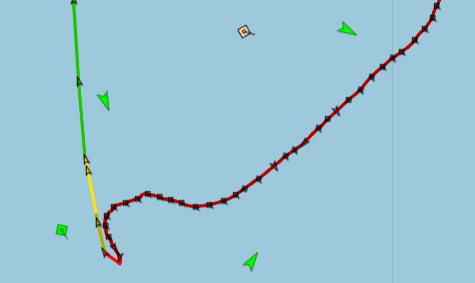
Speed Indicator
200
This sensor identifies and collects visible / articifal light at night.
Visible Infrared Imaging Radiometer Suite (VIIRS)
200
If a user wanted an idea of, for instance, precipitation saturation in an area, they would enable this layer
Weather layer
300
A 5 character code used to identify major trade and transport hubs, such as seaports
UN/LOCODE
300
Name the tool seen here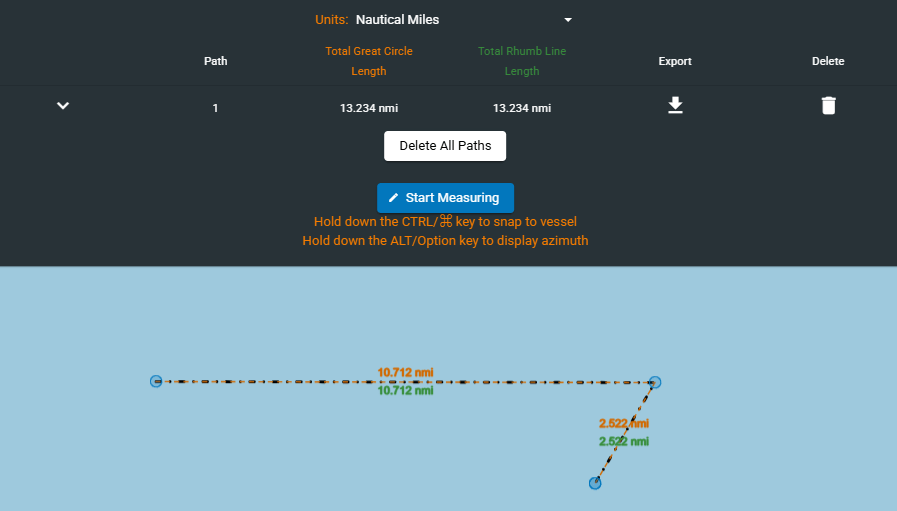
Distance Tool
300
This 7 digit number is a unique, permanent identifier for sea-going vessels and can be found on the vessel data card
IMO Number
300
This satellite based sensor provides digital images captured by sensors that detect visible, near-infrared, and short-wave infrared light reflected from Earth's surface.
Electro-optical
300
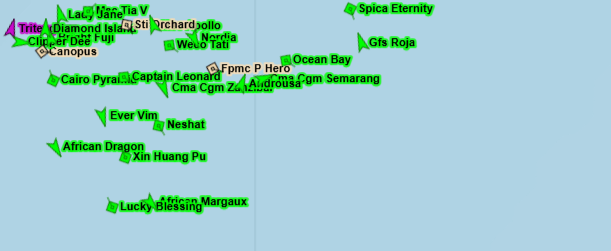 What layer has been enabled here?
Vessel Name
400
200-nautical-mile maritime area established under the UNCLOS treaty where a coastal state has sovereign rights to explore, exploit, conserve, and manage natural resources in the water, seabed, and subsoil
Exclusive Economic Zone (EEZ)
400
Using this tool, users can create a vessel search that runs twice a day for vessels matching specified criteria
Rules
400
What would a user need to toggle on the vessel data card to show what is shown here in this image?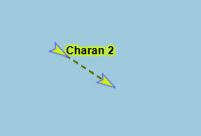
DR Vector
400
This satellite based sensor creates 2D or 3D images of objects by emitting microwave pulses and measuring the backscattered signal; operates in all weather conditions, day or night.
Synthetic Aperture Radar (SAR)
400
This Map view is data intensive but offers a "top-down" detailed image of the Earth's surface to include surface features and buildings.
Satellite view
500
The four intermediate compass points located halfway between the primary cardinal directions. These four points—Northeast (NE), Southeast (SE), Southwest (SW), and Northwest (NW)—are positioned at 45° intervals between the cardinal points, helping to provide more precise navigation
Ordinal directions
500
Name the tool seen here
Time Machine / Playback
500
This type of information on the vessel data card refers to real-time, frequently updated AIS data crucial for navigation, including GPS position, Speed Over Ground (SOG), Course Over Ground (COG), and heading
Dynamic Information
500
This data source is generated by SeaVision users
User Vessel Reports
500
Using the tool seen here, a user can create what?
Custom user views