Web Import Tool
Troubleshooting
Troubleshooting ll
User Defined
Platform Configuration
100
What is the Web Tool used for?
Mass updating employee information.
100
Why would a validated Web Import Template be missing from the drop down selection on the file upload screen?
The template wasn't activated.
100
Web Import Error:
Unable to locate Employee (906512) by identifier rule: EMPLOYEEID and company (WRC)
What is the problem on the template?
EMPLOYEEID = number
Company = code
**Employee number is wrong
**Company code is wrong
**Both are wrong
100
What are User Defined Fields?
System delivered customizable fields.
100
What is the first step in creating a PCF?
Select a class. Example Employee
200
What is the navigation path for the web import tool?
Administration > Integration Studio > Import Tool
200
Customer cannot see their PCF on the name, address, telephone 'Edit' page. What is the first thing you would check?
Data service > Employee Class > View & Edit box.
200
Customer wants to do a web import for 500 employees. Prior to mass importing all employees our best practice suggests what?
Import one employee first to make sure the data updates the way you want. This will save the customer time and headache.
200
What is the acronym for user defined fields on the Jobs > Other Company Information page?
EEC
200
Can you mass update PCF using the web import tool?
Yes!
300
What box has to be checked to show system delivered templates in the web import tool?
Check the box for 'Available'
300
Customer adds a UDF to the other personal information page but when the customer tries to update the field with the word 'LARGE' but when she types nothing shows. Why?
Field Type is not a Text field
300
What file type can you use when importing your data in the Web Import Tool?
csv
300
What is the acronym for user defined fields on the Personal > Other Personal Information page?
EEP and EIN
300
What two boxes do you check under the data services > fields?
View and Edit
400
In order to see a web import template in the drop down menu on the File Upload screen, what two things must be completed on the File Mapping screen?
1. Validate the template
2. Make template available
400
UDF for EIN isn't showing on employee Brian Balee's Other Personal Information page. Why?
Brian Balee is a US employee. EIN only show for Global Employees
400
What article should you use to troubleshoot file processing statuses for the Web Import Tool?
Article 000173731
How to Troubleshoot File Processing Statuses in the UKG Pro Web Import Tool
400
What do you have to select to make UDF visible to employees in a US Company?
Select the associated country: USA
Toggle the visibility switch to YES for Viewable by Employee.
400
PCF are defined by two types of classes. Name both classes.
1. Company Related
2. Employee Related
500
How do I find the Platform Configuration ID and Path names for Platform Configured Fields in the Web Import Tool.
Administration > Integration Studio > Import Tool > Configuration > PC Fields > ID and Path Columns next to the specific field.
500
Customer processes a Web Import and the status shows 'error'. What column should the customer 'add' on the Results screen to see the specific errors?
Messages
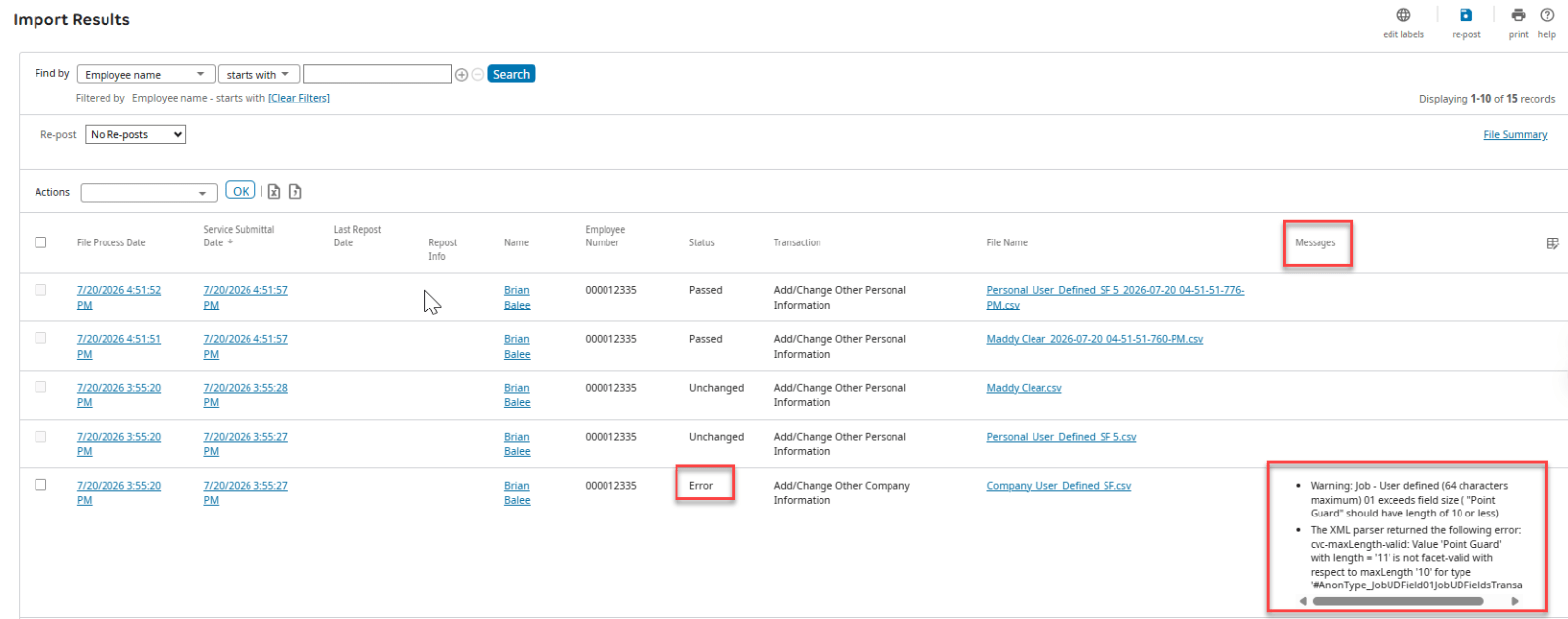
500
Web Import Tool file upload history remains visible to the customer and accessible to support for how long?
Files are only available for 30 days from the date of import. Requests for files older than 30 days cannot be fulfilled as the data is permanently purged from the system to ensure compliance with data protection regulations.
Article: 000175521
500
Name one of the Web Import Templates used for mass updating UDF fields?
1. User Defined Fields Update EEC (Company)
2. User Defined Fields Update EEP (Personal)
3. User Defined Fields Update EIN (International)
500
What two things are required in the mapping of the template to update a PC fields?
1. ID = Token
2. Path = Path