Interfaces & Set Up
OmniCenter
Item Management
OC Web
CPM
Miscellaneous
100
This is where you pull the initial items to build the CPM database table
What is the Master formulary?
100
It is where you go to add a new vendor in Omnicenter
What is the Vendors database table?
100
The tab to see which items need to be packaged as a unit dose from bulk
What is Prepack?
100
It is what the colors represent in Device Workflow
What are Priority Types?
100
Its the two choices for Pick verification
What is Approve and Reject?
100
It's the amount of active labels per priority code for each label type
What is one?
200
Its the tab in Omnicenter where you can preview and generate an order
What is the restock tab?
200
Vendor Id, Vendor Name and Account Number
What are the three required fields when adding a vendor?
200
The information populated with a 2D barcode
What is lot number and expiration date?
200
Where an invoice goes after receiving
What is the Stock tab?
200
It is how many labels you can have for each priority
What is one?
200

In CPM, it is the area where you can determine which devices can be dispensed from first.
What is Device Workflow?
300
These are the Control levels that are removed when using CPM
What is 2,3,4 & 5 ?
300
The number of non-interfaced vendors that you can have.
What is Unlimited?
300
It is where you go to see how many locations you have for each medication
What is Item Management?
300
This is where you turn off pick verification
What are Picking Priorities?
300
The amount of Bulk locations can you have in a pharmacy
What is only one?
300
Another name for a network printer
What is a form printer?
400
The tab you go to in Omnicenter to find Global Export and Import
What is the administration tab?
400
This route should be set when setting up a vendor order
What is Vendor?
400
Where an order goes after generated in Omnicenter
What is to the Wholesaler?
400
It is where you go to grant or add permission
What is Role Management?
400
Its what you do to receive non interfaced orders
What is add an invoice?
400
Patient, Area and Cabinet
What are destination picks?
500
It is your user name and password when you first set up your CPM Main
What is omnitech / omnitech?
500
The Omni Type that needs set when building an OmniSupplier in Omnicenter
What is Central Pharmacy?
500
Needs based and On Demand
What are the two types of Internal Transfers?
500
Standard and Enterprise
What are the two types of roles?
500
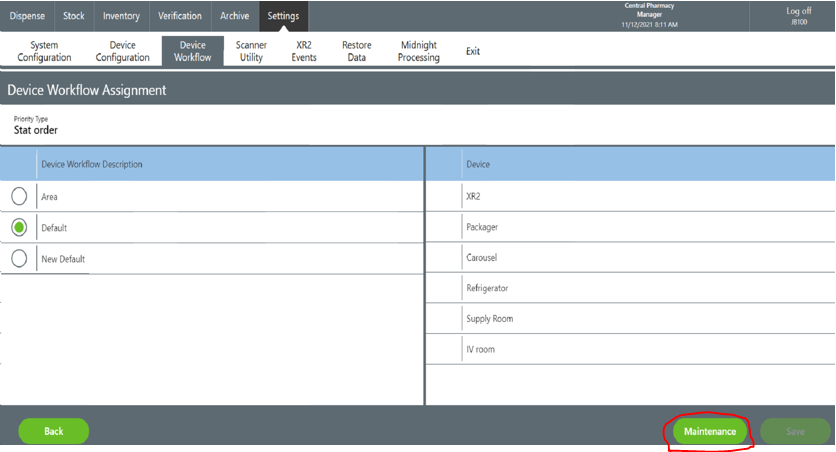
It's the name of the button to change the sequence of a workflow
What is Maintenence?
500
The device used to assign multiple pack sizes
What is the XR2?
600
It what you type in the service location box for your CPM Main
What is localhost?
600
NDC meaning
What is National Drug Code?
600
This is the restock source for Remote Ordering and Satellite Pharmacy's
What is CPM?
600
It is where you can set pick verification
What is Picking Priorities?
600
You have to do this first before rerouting or cancelling an item in the unfilled tab
What is check the line item?
600
It is not an inventory control system, needs no additional license and is a web based application.
What is Remote Ordering?
700
It is the button to press when you want to view an order before generating
What is Preview?
700
It is what CPM communicates with
What is Omnicenter?
700
Unit Dose or Bulk
What are package forms?
700
It is where you can turn off pick verification
What are the picking priorities?
700
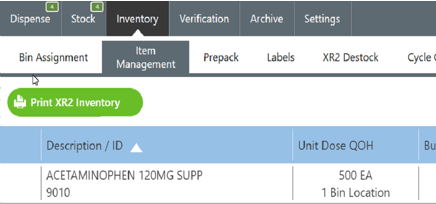
In CPM, its the tab to print XR2 inventory
What is Item Management?
700
This needs a separate license other than CPM
What is Satellite Pharmacy?
800
It is how you can identify a CPM Main when clicking on "Central Pharmacy Manager" wording
What is confirm the IP address on the system and the TC?IP address?
800
It is where you go in Omnicenter to add a license for a CPM Main
What is the OmniSuppliers table?
800
In CPM, it is where you go to see the quantity to package
What is Prepack?
800
You check this in picking priorities to move the priority type to the top of the list
What is High Priority Interrupt?
800
It is the two choices when verifying picks
What is Approve and Reject?
800
It is the priority type used most often with XR2 Quick Pick bins
What are First Dose Orders?
900
This needs to be unchecked to prevent a device from reordering from itself
What is Auto Restock?
900
It is the table in Omnicenter where you can add areas so they will display in CPM
What is the OmniSuppliers table?
900
It's the permission needed to do bin assignments and access item management.
What is the Modify Bin Permission?
900
This is a custom role
What is an Enterprise role?
900
This is where you can update QOH and expiration dates in CPM
What is Cycle count?
900
Cart module, Quick Pick Bins and Auto Packager
What are the three output devices in XR2?
1000
It is the area in Restock routes to check the "PO for each device"
What is the "Omnis" tab?
1000
Two ways to add a barcode for CPM
What is add in Omnicenter or associate a barcode in CPM?
1000
The two choices to select for a reorder source
What is Internal and Vendor?
1000
You need this permission to verify picks yourself
What is Pick verification Override?
1000
In CPM, it is where you can change a workstation name or add a new device
What is Device Configuration?
1000
These are two areas to check in Omnicenter to enable barcode scanning
What is Confirm issue and confirm restock?