Dissecting the Document
Panels Are All I Know
Potpourri
Type Type Baby
It's Copyright, Not Copywrong
100
The area outside the page content that extends beyond the trim edge and accounts for inaccuracies with printing or trimming.
What is the Bleed?
100
In this panel you have options such as Jump Object or Wrap Around Bounding Box.
What is the Text Wrap Panel?
100
This symbol in the bottom of a text frame indicates that there is more text in the frame that is not visible.
What is a red plus icon?
100
A collection of variations and styles of the same font is called a ____ _________.
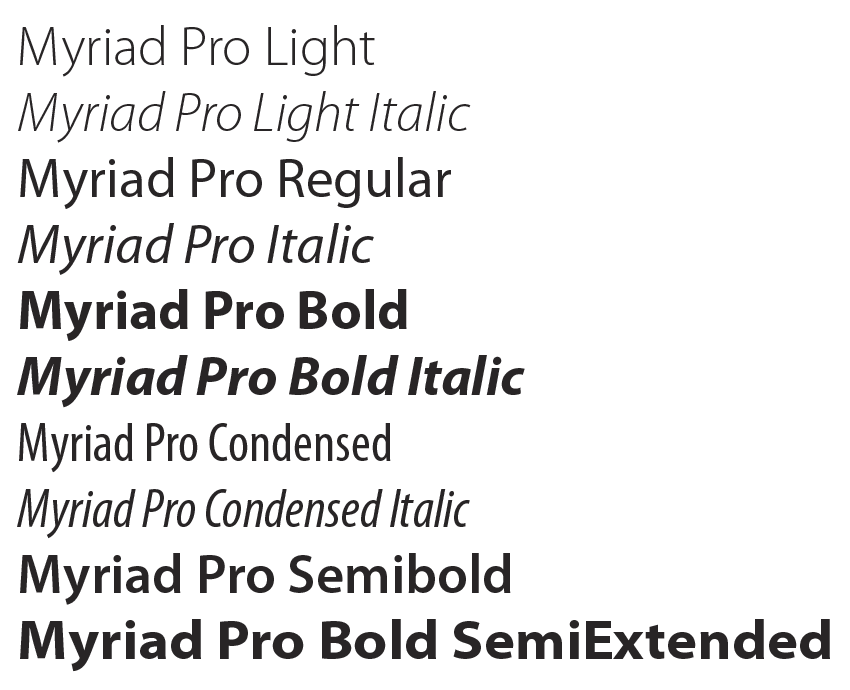
What is a Font Family?
100
An international nonprofit organization that enables the legal free sharing and use of creative works.
What is Creative Commons?
200
When you select this option, document pages will be arranged into spreads.
What is Facing Pages?
200
This Panel allows you to create designs from intersecting shapes, such as in this example.
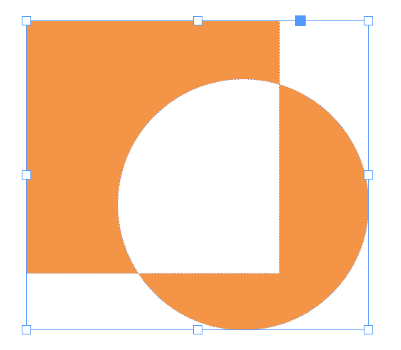
What is the Pathfinder Panel?
200
The option to perform a Spelling Check can be found under this menu.
What is the Edit Menu?
200
This controls the amount of space between lines of type.
What is Leading?
200
Creative work that falls into this category can be used without permission because it is owned by the public and not an individual.
What is Public Domain?
300
The space that separates text or objects from the edge of the page.
What is the Margins? (Also known as Page Margins.)
300
You can add hyphenation or remove hyphenation from your text in the _____________ Panel under the _____________ section.
In the Properties Panel under the Paragraph section.
300
The top frame displayed here is a _______ Frame, while the bottom frame is a _______ Frame. 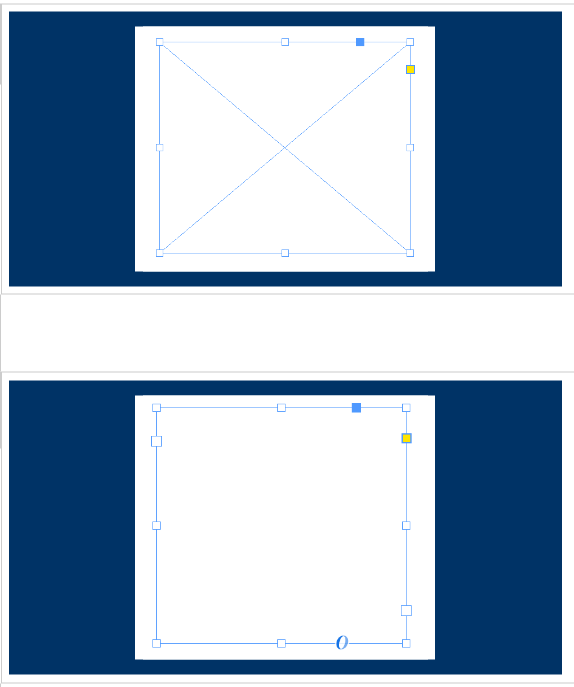
The top frame is a Graphic Frame, while the bottom frame is a Text Frame.
300
This is a variation on a typeface, such as Bold, Italic, or Normal.
What is Type Style or Font Style?
300
What is the meaning of the symbol pictured here and what organization uses this symbol?

This symbol is used by Creative Commons to signify that a work is for non-commercial use only.
400
The space between column guides and other layout elements.
What is the Gutter?
400
You can find a variety of Panels under the Style category in InDesign. What are three types of Styles you can create in InDesign?
Character Styles, Paragraph Styles, and Object Styles
400
You can change the quality of graphics and objects to increase or decrease the quality of performance for the entire document. Just go to the _______ Menu and choose __________ ____________.
Go to the View Menu and choose Display Performance.
400
____(a)____ controls the space between two specific characters, while ____(b)____ sets the amount of space between a range of characters. You must say the answers in the correct order.
What are a)Kerning and b)Tracking?
400
This is a work or invention that is the result of creativity. It is an original creation that comes from one's mind.
What is Intellectual Property?
500
The area outside the page content that contains printer instructions and other non-printing information, such as a title and date.
What is the Slug?
500
What file type is backwards compatible with older versions on InDesign?
IDML
500
Which of these options resizes the content to fill the entire frame, but preserves the content's proportions?
A) Fit Content to Frame
B) Fit Content Proportionally
C) Fill Frame Proportionally
D) Fit Frame to Content
C) Fill Frame Proportionally
500
Arial is an example of this type of font.
What is a Sans-serif font?
500
What is the meaning of this symbol?

No Derivatives: Work may be shared only as-is and with credit given to the original creator.