HTML
CSS
Miscellaneous Coding/Class Stuff
jQuery
Flexbox
100
This is the total number of heading tags that exist.
What is "6"?
100
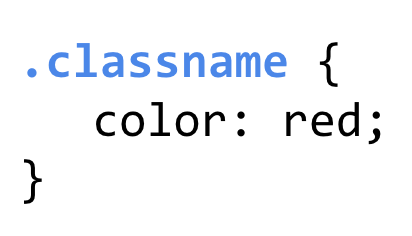
What's the term for the highlighted part of css?
What is a "selector"?
100
What is the website we use to code?
Popcode
100
What symbol do you need to include to show the computer that jQuery is being used?
$ (dollar sign)
100
What CSS property and value must be set to enable flexbox?
display:flex;
200
Everything that renders on the page goes between these tags.
What is the <body> tag?
200
In the code below what is the value?
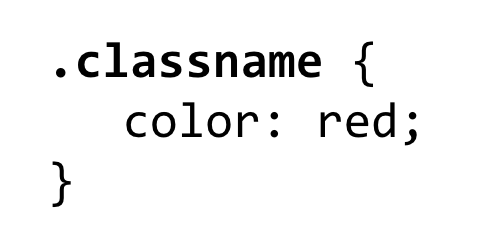
What is "red"?
200
What are the three parts of the box model?
Padding, border, margin
200
In the example below, what are the selector(s)?

".wavesImg" and ".headerWaves"
200
What justify-content value would align all HTML elements to the right of the page?
Flex-end
300
This is the attribute associated with <img> tags.
What is "src" (or source)?
300
In the code below, what is missing?

What is a "semicolon"?
300
This computer programmer found an actual bug in her computer hence giving rise to the term "debugging".
Who is "Grace Hoper"?
300
In the example below what is the event?

Double click
300
What justify-content value would align all HTML elements to the left of the page?
flex-start
400
Write an <a> tag that links to Facebook with the link text "Go to Facebook".
<a href="https://facebook.com">Go to Facebook</a>
400
This is the symbol used in CSS to represent a class.
What is "a period"?
400
What three materials/resources should you reference before asking a teacher for help?
1. Reference table 2. Google 3. A friend
400
DAILY DOUBLE!!
What is the error in the code below?:
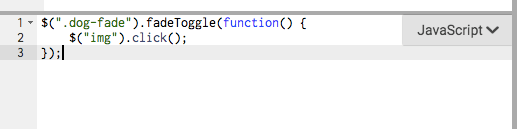
The event and the action are switched. FadeToggle is not an event and shouldn't be in the first line.
400
What justify-content value would align all HTML elements to the center?
center
500
What two steps do you need to follow to add a Google Font?
1. Add the link to the font to the head.
2. Use the property "font-family" in CSS to write the font.
500
Write the CSS code that would make all "img" tags of a class "homepage" 100px's big.
.homepage{
width: 100px;
}
500
What are the names of all the volunteer teachers in this class?
WCHS #1: Paul, Paulina, Erik, Maxwell
WHSAT #2: Alec, Pat, Ben, Maxwell
500
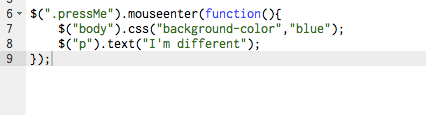
Write the code that would do the following:
500
Write the CSS that would add space between items in a div with the class of "header"
.header{
display:flex;
justify-content: space-between;
}